ClashFX Download and GitHub for macOS
Open-source macOS proxy client powered by mihomo
TUN mode · Visual config editor · GitHub Releases · ClashX migration guide
GitHub Releases · macOS 12+ · Apple Silicon & Intel · Free and open source
ClashFX Download FAQ
Fast answers for GitHub, download, and ClashX migration searches.
-
Yes. ClashFX is available on GitHub, and the download buttons on this page point to GitHub Releases or the public repository.
-
Use Download Latest Release to get the current DMG, then drag ClashFX.app into Applications and follow the first-launch security steps below.
-
For most macOS users, yes. ClashFX keeps the familiar Clash workflow while adding mihomo core, TUN mode, active updates, and a visual config editor.
-
Yes. ClashFX includes enhanced TUN mode for system-wide proxy routing on macOS.
-
Start with your subscription URL, import it into ClashFX, then choose the new profile. If you need the general workflow, read the subscription setup guide.
Why ClashFX
ClashX simplicity with modern power
Enhanced Mode (TUN)
Virtual TUN interface for system-wide proxy — toggle from the menu bar, no extra setup.
Visual Config Editor
YAML syntax highlighting plus form-based editing for proxies and rules — no manual file wrestling.
5 Languages
Chinese, English, Traditional Chinese, Japanese, and Russian — switch anytime.
40+ Rule Types
mihomo core: GEOSITE, RULE-SET, logic rules (AND/OR/NOT), regex — far beyond legacy ClashX.
Active Maintenance
Updated mihomo core, latest macOS support, online GeoIP updates, long-term support.
ClashFX vs ClashX Pro
Features ClashX Pro does not offer
| Feature | ClashX | ClashX Pro | ClashFX |
|---|---|---|---|
| Basic proxy | ✓ | ✓ | ✓ |
| Enhanced mode (TUN) | ✗ | ✓ | ✓ |
| Visual config editor | ✗ | ✗ | ✓ |
| YAML syntax highlighting | ✗ | ✗ | ✓ |
| 5 languages | ✗ | ✗ | ✓ |
| macOS 26+ support | ✓ | ✗ | ✓ |
| mihomo core | ✗ | ✗ | ✓ |
| Active updates | ✗ | ✗ | ✓ |
Download ClashFX

ClashFX
v1.1.4Next-gen macOS proxy client on mihomo — free and open source
First-time Install Guide
ClashFX is not Apple-notarized yet. macOS will show a security prompt on first launch — follow these steps.
⚠️ This is normal for unsigned macOS apps — not unique to ClashFX.
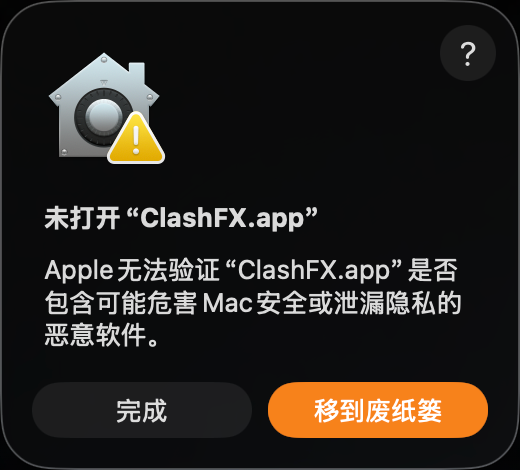
Double-click — security alert
After dragging ClashFX.app to Applications, double-click to open. This warning is expected for unsigned apps.
👉 Click “Done” (not “Move to Trash”)
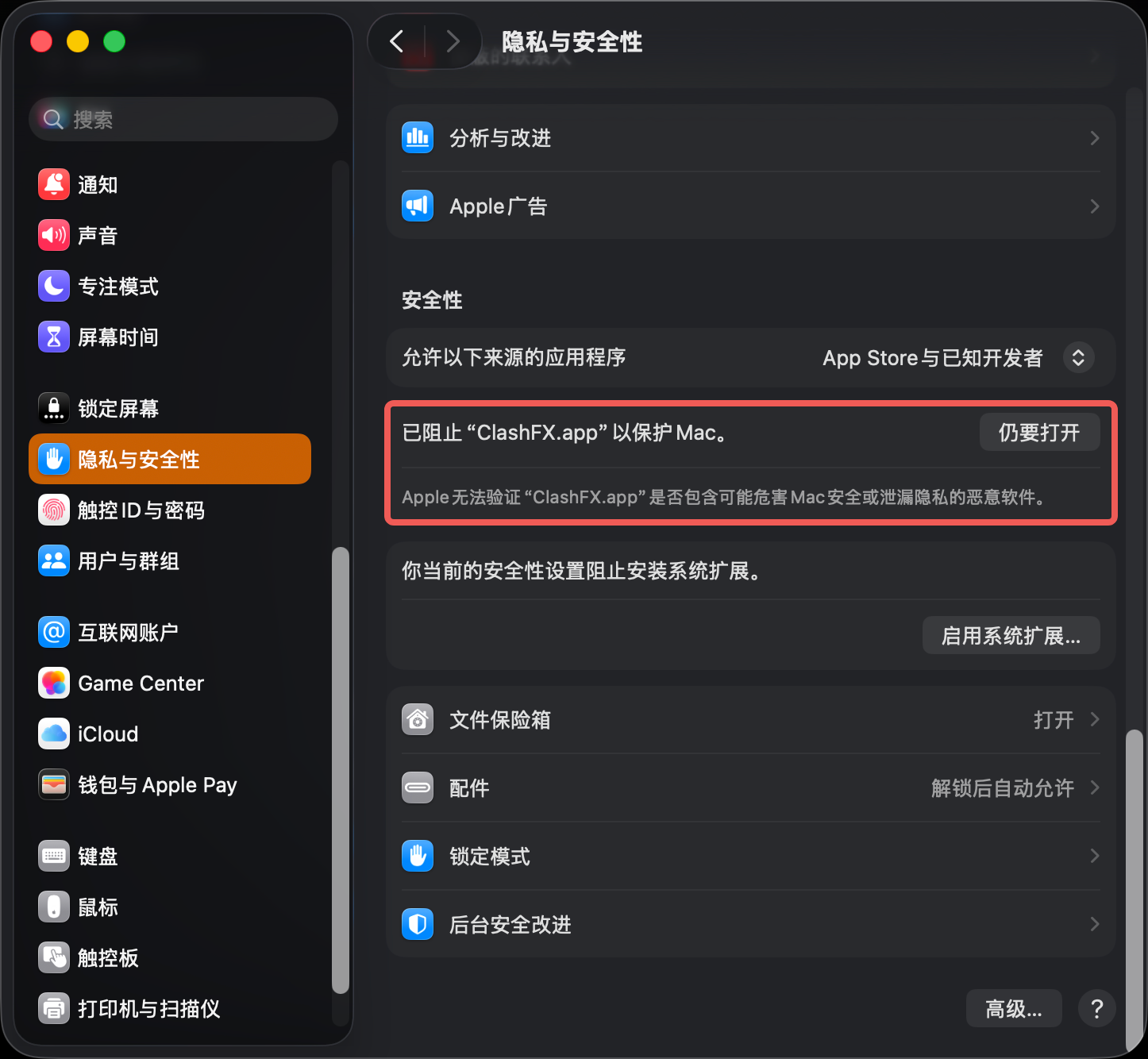
System Settings → Privacy & Security
Open System Settings → Privacy & Security, scroll to Security — you’ll see ClashFX was blocked.
👉 Click “Open Anyway”
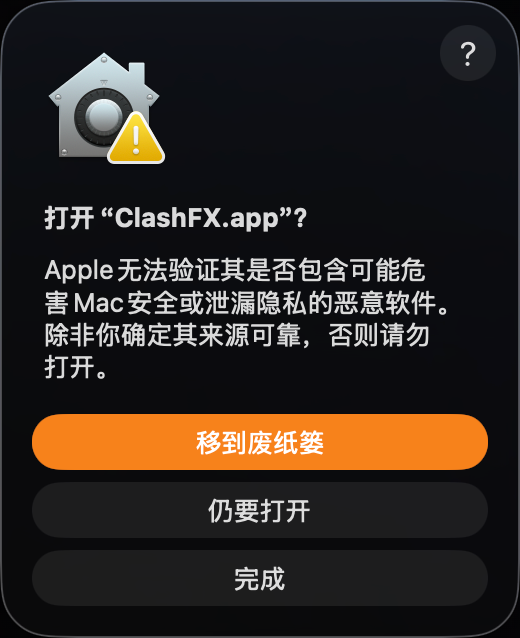
Confirm open
macOS asks once more to confirm. This is the final gatekeeper step.
👉 Click “Open”
You won’t see this again on later launches
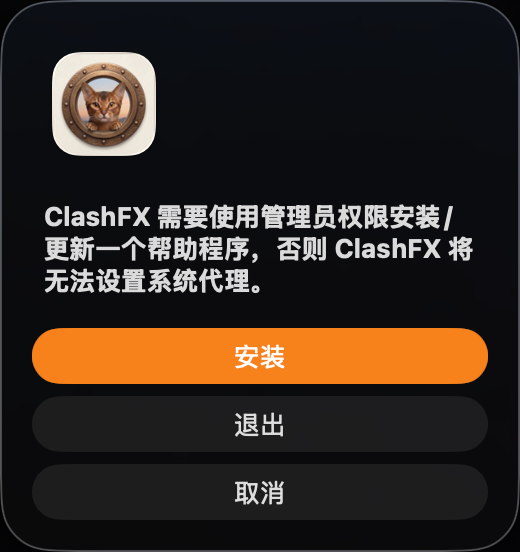
Install helper
ClashFX needs a helper to set system proxy — required for system proxy mode.
👉 Click “Install” and enter your Mac password
ClashFX is ready to use 🎉
💡 Terminal shortcut
Skip the steps above and remove the quarantine flag:
sudo xattr -rd com.apple.quarantine /Applications/ClashFX.appEnter your password, then double-click ClashFX to open directly.
Migrate from ClashX to ClashFX
Three steps to switch seamlessly
-
Download ClashFX
Get the latest DMG from the button above or GitHub Releases, then drag into Applications.
-
Auto config migration
On first launch, ClashFX copies config from
~/.config/clash/to~/.config/clashfx/— subscriptions and rules preserved. -
Enjoy new features
Enable TUN mode, use the visual editor, switch UI language — experience the next-gen client.
Deep-dive Guides
Get more from ClashFX
ClashFX + NordVPN Dual Encryption
TUN mode + NordLynx with NordVPN — routing setup and performance tests.
Read guide →Can .ovpn convert to Clash YAML?
Why protocols don’t match, and 3 practical alternatives for VPN users.
Read answer →Clash Meta + VPN Guide
Dual-layer proxy + VPN principles, use cases, and pitfalls.
Read guide →